
6 Best MusicBee Alternatives in 2026

The best MusicBee alternative depends on why you're leaving. If you need macOS or Linux, try foobar2000 (macOS) or Strawberry (Linux); if you want a heavier library manager on Windows, MediaMonkey; if you want a lighter player, AIMP; and if you want a simpler library that leaves your folders untouched and lets you listen from your phone without running a server, try Sonikr Media Hub (Windows, free).

Why people look for a MusicBee alternative
- Windows-only compatibility: MusicBee officially provides a Windows version only, with no native macOS or Linux app. As a result, users moving from Windows to Mac or Linux often need to find a new local music management tool.
- Complicated interface and learning curve: MusicBee offers extensive customization, but its feature-packed interface can feel overwhelming to users who prefer a simpler way to browse and play music.
- Performance concerns with extremely large libraries: While MusicBee handles most personal music collections efficiently, users with exceptionally large libraries may encounter slower startup times or memory limitations.
- Limited cross-device experience: MusicBee is primarily a Windows desktop music management software and cannot provide the same user experience as a native cross-platform music app.
- Different music library management preferences: Some users prefer a more straightforward approach to organizing their local music collections, with intuitive album browsing, clear library views, and fewer settings to configure.
The best MusicBee alternatives in 2026
1. Sonikr Media Hub - Best Free MusicBee Alternative for Windows
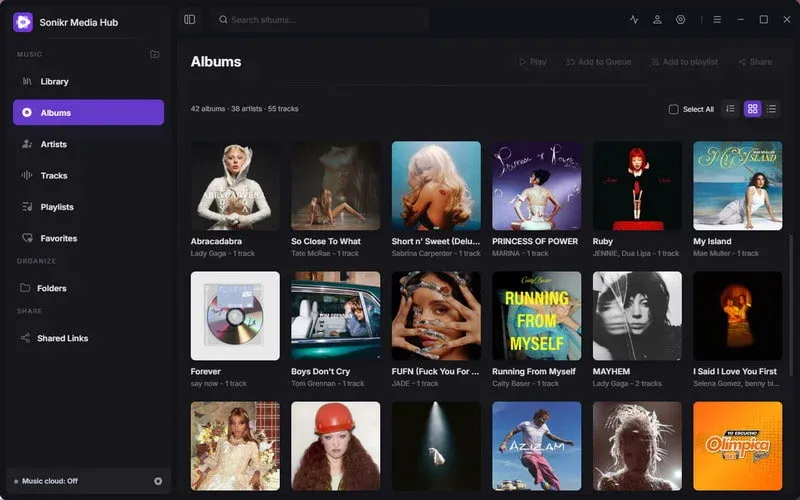
Sonikr Media Hub is a free music library manager for Windows (Mac version coming soon). As a user-friendly MusicBee alternative, it offers a clean, intuitive interface to organize, browse, and play your local music collection without complicated setup.
Sonikr automatically scans music from your computer or external drives and organizes tracks by album, artist, and song, complete with artwork and metadata. You can easily search, sort, and filter your library, create playlists, and save favorites, all while keeping your original music files in place.
Beyond local playback, Sonikr supports remote library access and music sharing. When your main computer is online, you can access your collection remotely or generate shareable links for tracks, albums, and playlists, with control over link availability. It's a great choice for users seeking a simple, private, and flexible MusicBee alternative.
- Free to use with no subscription required.
- Clean, intuitive music library interface.
- Keeps original music files stored locally.
- Optional remote access and controlled sharing.
- Remote access requires the host computer to remain online.
- Less suitable for users specifically seeking MusicBee's extensive interface customization and advanced audio tools.
2. foobar2000 – Best for Lightweight Audio Playback and Customization
foobar2000 is a free, highly customizable audio player and a solid MusicBee alternative for users who want more control over their listening experience. It supports a wide range of audio formats, including MP3, FLAC, AAC, WAV, and more, along with gapless playback, ReplayGain, and advanced audio processing options.
One of foobar2000's biggest strengths is its component-based design. You can customize the interface, install additional components, adjust audio output settings, and extend the player with features that suit your needs. It also offers music tagging, CD ripping, and audio conversion tools.
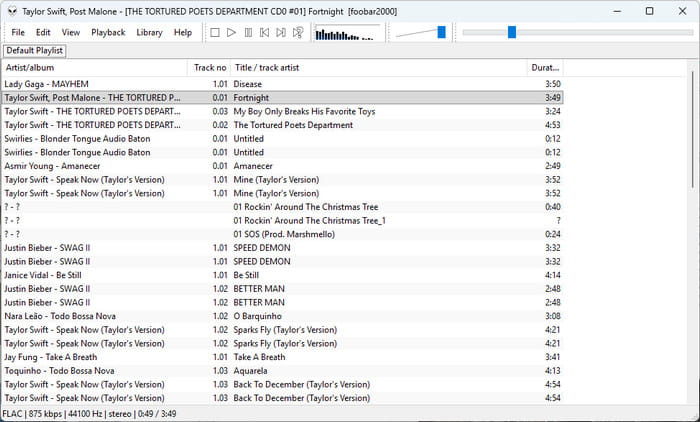
While foobar2000 can manage a music library, its real appeal lies in its flexibility and audio-focused features. It's a great choice for experienced users who enjoy building a personalized music player, though beginners may find its initial setup less intuitive than MusicBee.
- Completely free, with no ads or telemetry in the player.
- Lightweight and highly customizable.
- Supports numerous audio formats and gapless playback.
- Extensive component ecosystem and advanced audio settings.
- Available on Windows, macOS, Android, and iOS.
- The default interface is fairly basic.
- Advanced customization can require extra setup and third-party components.
- Less beginner-friendly for users wanting an attractive, ready-to-use music library interface.
3. MediaMonkey – Best for Managing Large Music Libraries
MediaMonkey is a powerful MusicBee alternative designed for users with large or complex music collections. It combines audio playback with advanced library management tools, helping you organize thousands of tracks, edit metadata, find duplicate files, and keep your collection in order.
A standout feature is its automatic tagging and file organization. MediaMonkey can identify tracks, retrieve missing album artwork and metadata, and rename or reorganize files based on information such as artist, album, and title. It also supports audio conversion, CD ripping, playlists, podcasts, and synchronization with mobile devices.
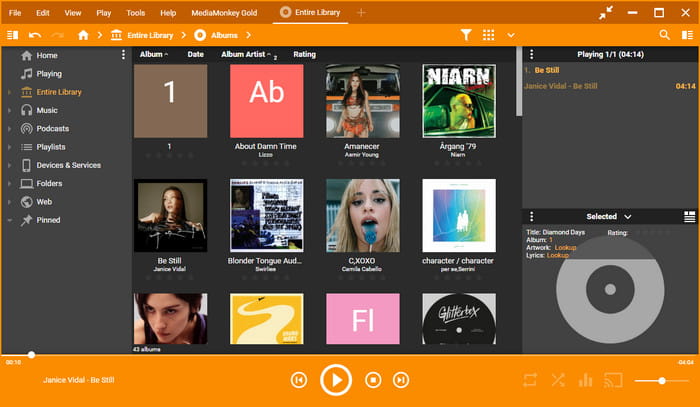
MediaMonkey offers a free Standard version, while MediaMonkey Gold unlocks additional features such as more advanced automatic organization, batch tagging, and custom collections. It's a strong alternative to MusicBee for serious music collectors, although its extensive options may feel overwhelming to casual listeners.
- Powerful library management for large collections.
- Automatic tagging, duplicate detection, and file organization.
- Supports CD ripping, audio conversion, and device synchronization.
- Android app with Wi-Fi syncing capabilities.
- Some advanced features require a paid Gold license.
- Feature-heavy interface may take time to learn.
- No native macOS or Linux desktop version.
4. Strawberry Music Player – Best Open-Source MusicBee Alternative for Linux
Strawberry Music Player is an open-source MusicBee alternative built for music collectors and audiophiles. Based on Clementine, it focuses on playing and organizing local music collections, with strong support for lossless formats such as FLAC, WAV, ALAC, and WavPack.
Strawberry includes useful music management tools, such as smart playlists, tag editing, album artwork lookup, and automatic metadata retrieval through MusicBrainz. It also offers an equalizer, ReplayGain support, and advanced audio output settings, including bit-perfect playback options on Linux.
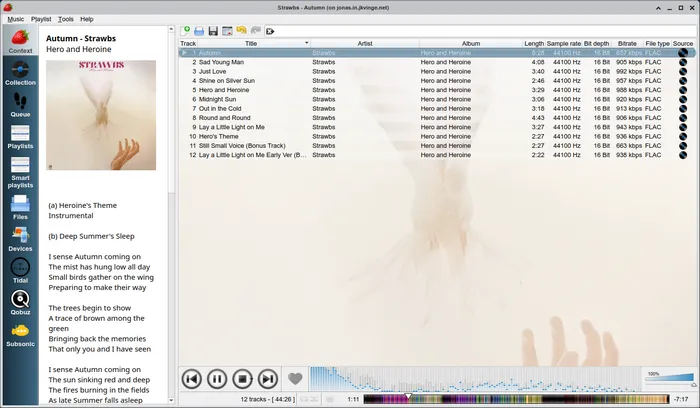
Unlike MusicBee, Strawberry supports Linux, Windows, and macOS. However, while Linux packages are generally available for free, official Windows and macOS builds currently require sponsorship access. Strawberry is particularly appealing to Linux users who want a music-focused player without unnecessary multimedia features.
- Open-source music player focused on local collections.
- Excellent support for lossless audio formats.
- Smart playlists, metadata editing, and album artwork lookup.
- Advanced audio output options, especially on Linux.
- Official Windows and macOS builds require sponsorship access.
- No official Android or iOS app.
- Interface design may feel traditional compared with newer music applications.
5. AIMP – Best for Audio Playback and Sound Effects
AIMP is a free MusicBee alternative that combines high-quality audio playback with a collection of built-in audio tools. It supports a wide range of audio formats, including MP3, FLAC, WAV, AAC, and OGG, making it a practical choice for users who mainly want to enjoy their local music.
One of AIMP's highlights is its audio customization. The Windows version includes a 20-band equalizer, sound effects, volume normalization, and support for advanced audio output options such as ASIO and WASAPI. It also comes with a music library, smart playlists, an audio converter, and a tag editor for managing music files.
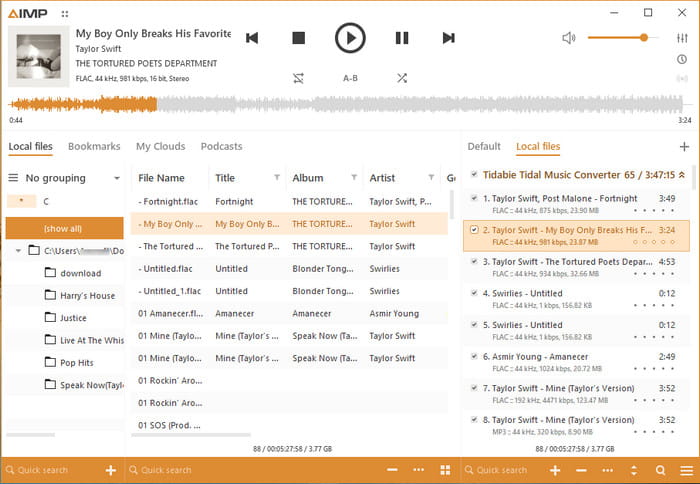
AIMP is especially suitable for users who prefer a playback-focused alternative to MusicBee. Its customizable skins, multiple playlists, and built-in audio tools provide plenty of flexibility without requiring paid upgrades. However, users who prioritize extensive music library organization may find MusicBee or MediaMonkey better suited to their needs.
- Completely free to use.
- Built-in 20-band equalizer and audio effects.
- Includes audio converter, tag editor, and smart playlists.
- Customizable skins and Android version available.
- No macOS version; native Linux support is still in beta.
- Music library experience is less central than audio playback.
- Many audio settings may be unnecessary for casual listeners.
6. JRiver Media Center – Best for Advanced Multimedia Management
JRiver Media Center is a comprehensive MusicBee alternative for users who want more than a traditional music player. It works as an all-in-one media manager, allowing you to organize and play music, videos, photos, and other media from a single application.
For music enthusiasts, JRiver offers extensive library management, support for high-resolution audio, advanced playback settings, and audio processing tools. It also includes media networking features that allow users to stream content to compatible devices around the home. This makes it particularly attractive to audiophiles and users with a large collection of different media types.
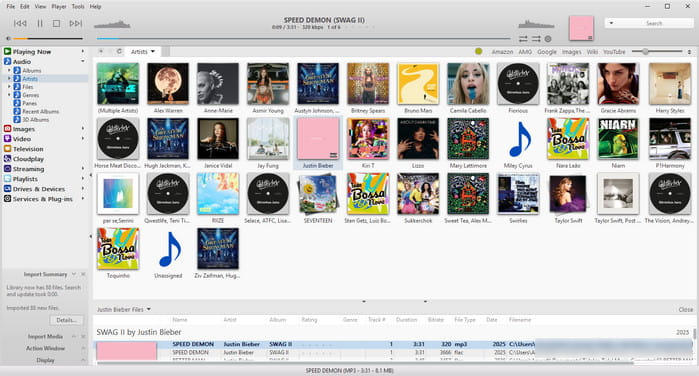
Unlike MusicBee, JRiver Media Center is available for Windows, macOS, and Linux. However, it is commercial software rather than a free alternative. A 30-day trial is available, but continued use requires a paid license. Its broad feature set also makes it less suitable for users who simply need a lightweight music player.
- All-in-one music, video, and photo library management.
- Advanced audio playback and processing features.
- Supports high-resolution audio and media networking.
- Paid license required after the 30-day trial.
- Extensive settings and features can be complicated for beginners.
- May be excessive for users who only need local music playback.
MusicBee alternatives compared
How We Tested: All tests were conducted on a Windows 11 Pro computer using a collection of 200 songs (9.43 GB in total), including 6 AIFF, 106 FLAC, 31 M4A, 49 MP3, and 8 WAV files. The tracks came from different albums and playlists, with some duplicate files intentionally included.
Test 1: Library Import & Duplicate Detection. We measured how long each player took to import 200 songs and checked whether all files were recognized correctly. And checked whether duplicate files are automatically detected, removed, or flagged.
Test 2: Library Organization. We browsed albums, artists, and tracks to evaluate categorization accuracy, metadata organization, and album artwork display.
Test 3: Search Performance. We searched for specific songs and evaluate response time and the accuracy of search results.
Test 4: Resource Usage. We monitorrf RAM and CPU usage in Windows Task Manager while the software is idle, playing music, and scanning the library.
Test 5: Playlist Management. We created a playlist of 20 songs, rearrange the track order, and save it. Record the steps required and whether the changes are saved successfully.
Test 6: File Updates & Metadata Handling. We modifided audio file tags or update the scanned music folders to check whether the software detects changes and how it handles the original files.
Test 7: Audio Playback & Format Support. We played MP3, FLAC, WAV, and AAC/M4A files to check format compatibility, gapless playback support, and available audio effects.
| Software | MusicBee | Sonikr Media Hub | foobar2000 | MediaMonkey | AIMP | JRiver Media Center |
|---|---|---|---|---|---|---|
| Price | Free | Free | Free | Standard: Free Gold: $39.95 |
Free | From $79.98 (30-day trial) |
| Import Time (200 Songs) | 2~3s | ~3s | ~8s | ~6s | ~1s | 4~5s |
| RAM During Playback | 30.5~77.3MB | 290~560MB | ~45MB | ~139MB | 15~30MB | 22~37MB |
| Search Response | <1s | <1s | <1s | 1s | 1~2s | 1s |
| Library Organization | Artists, tracks | Albums, artists, tracks | Tracks | Albums, genres, artists, composers, years, etc | Tracks | Albums, artists, files, genres, etc |
| MP3/FLAC/WAV/AAC Support | ✅ | ✅ | ✅ | ✅ | ✅ | ✅ |
| De-duplicate | ✅ | ❌ | Yes, but not work | ❌ | ❌ | ❌ |
| Burn CD | ✅ | ❌ | ❌ | ✅ | ❌ | ✅ |
| Share via Link | ❌ | ✅ | ❌ | ❌ | ❌ | ❌ |
| Remote access | ❌ | ✅ | Yes, settings required | Yes, settings required | Limited | ✅ |
P.S. This test skipped Strawberry Media Player since the official Windows builds require sponsorship access.
Hands-On Testing: Our Experience with Each Player
MusicBee: MusicBee has a somewhat dated interface, but it scans local music files quickly without requiring manual imports. In our test, tracks were mainly displayed in lists, with album artwork appearing in a side panel rather than directly in the library view. Playlist creation felt less intuitive, as songs had to be added from the library. On the plus side, it played all our test formats and offered useful tools like tag editing, CD burning, and duplicate filtering. Its Now Playing tab also displayed interesting background information about the current track.
Sonikr Media Hub: Sonikr offers a modern, streaming-style interface with fast library scanning and clear Albums, Artists, and Tracks sections. Album artwork, playlists, and Favorites make browsing and organizing music straightforward. A standout feature is sharing local music through links with customizable expiration dates. However, it currently supports Windows only, and it used noticeably more memory than the lightweight players in our tests, although its library scanning and navigation remained responsive with our 200-track collection.
foobar2000: foobar2000 has a basic, traditional interface. In our default setup, imported songs appeared in a single list without dedicated album or artist views, and some track numbers were displayed incorrectly. Adding music took noticeably longer than with other players, and playlist management felt cumbersome. While foobar2000 is known for its customization, its out-of-the-box library management experience was less convenient than MusicBee's.
MediaMonkey: MediaMonkey delivered one of the best library browsing experiences in our tests, with multiple ways to organize and display music. It supports drag-and-drop playlist management, shuffle and repeat modes, playback speed adjustment, batch tag editing, and CD burning. Overall, it felt like a well-rounded music player and library manager.
AIMP: AIMP feels more like a dedicated audio player, with a clean playback interface and straightforward controls. However, its multiple search fields made finding the right one confusing. In our test, AIMP automatically started playing music on launch, which felt intrusive. Large track notifications also appeared at the top of the screen for several seconds, interrupting our workflow. Additionally, we had to restart the application before newly imported songs appeared in the library.
JRiver Media Center: JRiver offers advanced library management, including smart playlists that update automatically based on custom rules, and drag-and-drop song organization. It also supports video and photo libraries, making it a more comprehensive media manager. One minor drawback was the track-change notification appearing in the bottom-right corner, which interrupted our workflow.
FAQs About MusicBee Alternatives
What is the best free alternative to MusicBee?
Sonikr Media Hub is a great free MusicBee alternative for users who prefer a clean interface and simple music library management. It organizes local music by albums, artists, and tracks, and supports playlists, favorites, and remote music sharing. Other free options include foobar2000, AIMP, and MediaMonkey's Standard version.
Is there a MusicBee alternative for Mac?
Yes. foobar2000 and JRiver Media Center both support macOS. Strawberry Music Player is another option, although its official Mac builds currently require sponsorship access. MusicBee itself is only available for Windows.
Which MusicBee alternative is best for managing large music libraries?
MediaMonkey is a strong choice for large music collections, offering advanced tagging, duplicate detection, automatic file organization, and playlist management. Sonikr Media Hub is worth considering if you prefer a simpler way to browse and organize your local music.
Final Thoughts
MusicBee remains a solid choice for managing and playing local music, but the alternatives above offer different strengths depending on your needs. If you prefer a cleaner interface and simpler music organization, Sonikr Media Hub is our top recommendation, with fast library scanning, intuitive browsing, and convenient music-sharing features. Meanwhile, foobar2000 and AIMP are great for audio playback, MediaMonkey excels at advanced library management, and Strawberry and JRiver offer additional options for different platforms. Ultimately, the best MusicBee alternative comes down to how you want to organize, manage, and enjoy your music.

Practical guidance for organizing, playing and remotely accessing the music you own.
